SSC CHSL · General Intelligence & Reasoning
Non-Verbal Reasoning
Figure-based reasoning covering figural series, analogy, classification and pattern completion.
A figural series, analogy or odd-one-out question is a strip of pictures, not a paragraph. The stem shows three or four frames and asks for the next one, or shows A : B :: C : ? in shapes, or shows four figures and asks which does not belong. Nothing in the stem is a riddle about the whole picture. Something specific changes from frame to frame — an arrow turns, a count of dots rises, a region shades and unshades — and your job is to name each of those independent changes, then apply every one of them once more. Hold one concrete strip through this topic: a square whose arrow turns 90° clockwise each frame (North, East, South, West), whose shaded cell walks a 2-by-2 grid, and whose dots increase by one. Every concept below is a way of reading that strip without guessing.
- SSC CHSL
- Medium level
- 6 concepts
- 43 practice questions
1Track each element, then apply once more
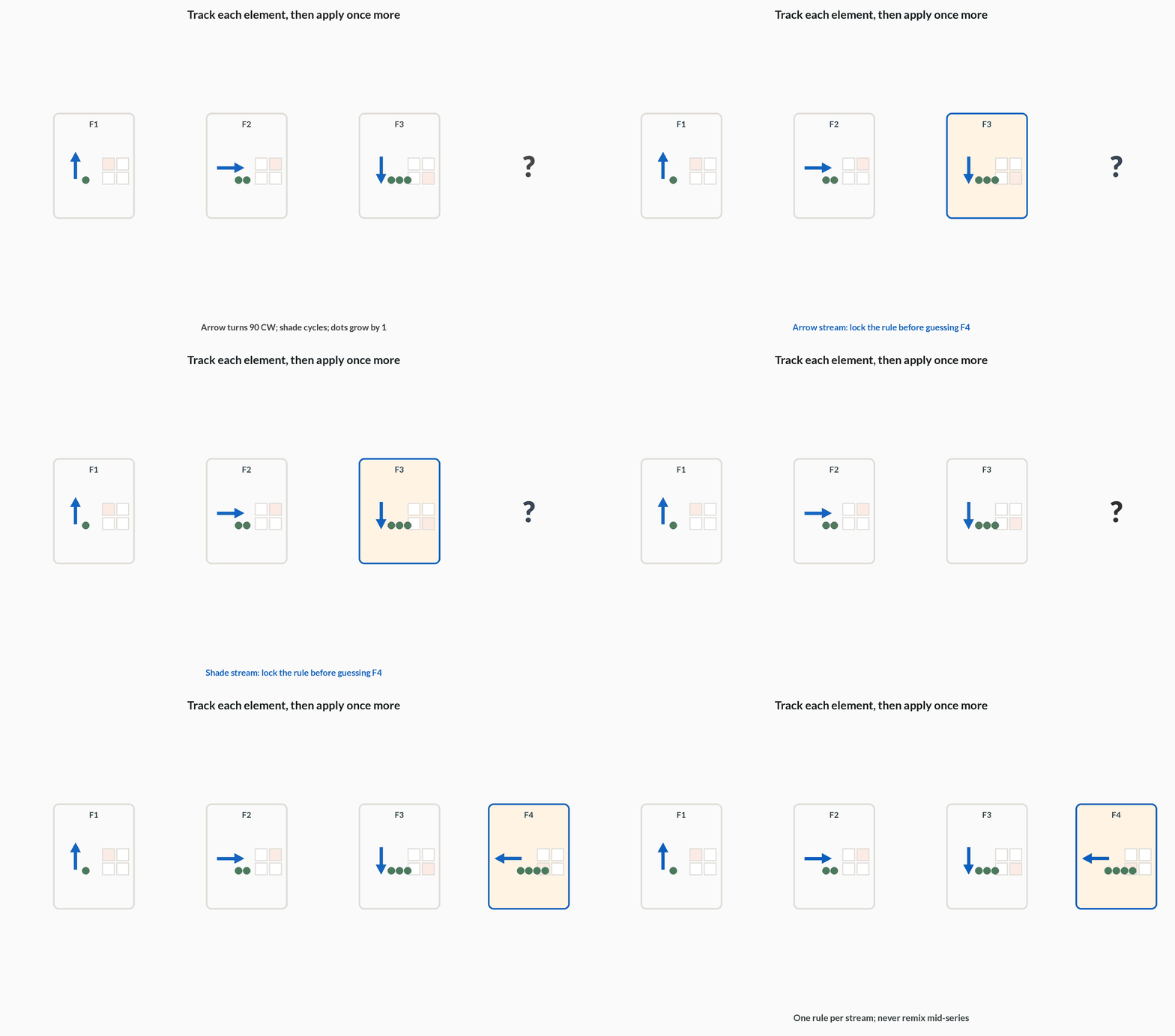
Start with what a figural series actually is. The exam prints several frames in a row — call them F1, F2, F3, and a blank for F4 — and each frame is a small picture built from a few independently moving pieces. One piece may be an arrow that turns. Another may be a shaded cell that walks around a 2-by-2 grid. A third may be a cluster of dots whose count rises. Those pieces do not wait for each other. Each follows its own rule, in parallel. The next figure is not a guess about the whole picture — it is each tracked change applied one more time.
Hold that strip. F1: arrow North, top-left cell shaded, 1 dot. F2: arrow East, shade top-right, 2 dots. F3: arrow South, shade bottom-right, 3 dots. Three streams, three rules: the arrow turns 90° clockwise each step, the shade walks clockwise around the four cells, and the dots increase by one. F4 is then forced: arrow West, shade bottom-left, 4 dots.
Miss any one stream and a distractor that continues the others will look right. An option that turns the arrow to West and shows 4 dots but leaves the shade stuck at bottom-right is built for the solver who tracked the obvious motion and stopped. Before you glance at the options, fill a small attribute table — one row per moving piece, one column per given frame — using rotation, count, shading and position as the Attributes to track table names them. Extend every filled column by one step. The option that matches all columns at once is the answer.
Order of attack
- Name the moversList every independently changing piece before comparing frames — on the running strip that is the arrow tip, the shaded cell, and the dot count. Ignore a still background. If you cannot name the movers, you are still staring at the whole picture.
- Fill the attribute tableFor each mover, record rotation, count, shading and position across F1, F2, F3. Arrow: North, East, South. Shade: top-left, top-right, bottom-right. Dots: 1, 2, 3. A blank cell means that stream does not move; do not invent a value to fill it.
- Apply once moreExtend every filled column by one step — West, bottom-left, 4 dots — and take the option that matches all columns at once. An option that continues two streams and freezes the third is a distractor, not a near-miss.
| Attribute | What to record per frame |
|---|---|
| Rotation | Angle and sense (clockwise / anticlockwise) of one reference mark |
| Count | Number of lines, dots or enclosed regions |
| Shading | Which region is filled; often toggles with period 2 |
| Position | Step of a moving mark around the frame or along a path |
In a four-frame series an arrow turns 90° clockwise each frame and a corner dot also advances one corner clockwise each frame. An option that turns the arrow correctly but leaves the dot unmoved is
- Correct, because rotation is the main rule
- Wrong, because every tracked change must advance together
- Correct if the shading also matches
The next frame applies every independent change once more. An option that continues only the arrow is a classic distractor for anyone who tracked one stream and stopped.
2Rotation per step
When the only clear change is a turn, the series is a rotation rule, not a new kind of puzzle. The running strip's arrow is the cleanest case: it points North in F1, East in F2, South in F3. Nothing about the arrow's length or colour needs reading. The whole job is to lock onto one reference mark — an arrow tip or a distinctive corner — and measure the angle and sense between two consecutive frames. That turn is the rule; every later frame applies it again.
Sense is the direction of the turn, and you have to name it in words before you trust an angle. Clockwise is the way clock hands move: from the top of the page toward the right. Anticlockwise is the opposite. A clockwise 90° step sends top → right → bottom → left, which in facing words is North → East → South → West — the Clockwise 90° cycle table. From F1 to F2 the arrow went North to East, which is 90° clockwise. Confirm on the next pair: East to South is 90° clockwise again. The rule is locked. Apply it once more to South and the blank is West.
Rotation per step equals the total turn observed divided by the number of steps between the frames you measured. If you only have F1 and F3 and the arrow went from North to South, that is 180° across two steps, so 90° per step — the same rule, recovered from a skip. Do not treat a 180° jump between non-consecutive frames as a 180° rule unless a consecutive pair also shows 180°.
Figure. One reference mark, one 90° clockwise step: North → East → South → West. Measure that step, then apply it again.
Fix the turn
- Pick one markFollow only the arrow tip (or one corner of a polygon). On the running strip that mark is the arrowhead; ignore a still square or a shaded cell that is a different stream.
- Measure one stepRead the angle and sense from frame n to frame n+1. North to East is 90° clockwise — the way clock hands move, top toward the right. Common exam steps are 45°, 90° or 135°.
- Confirm on the next pairCheck that the same turn repeats: East to South is 90° clockwise again. Then apply it once more to reach the answer frame — South plus 90° clockwise is West.
| Facing now | After one 90° clockwise step |
|---|---|
| North (top) | East (right) |
| East (right) | South (bottom) |
| South (bottom) | West (left) |
| West (left) | North (top) |
Figural rotation series
An arrow inside a square points North in frame 1, East in frame 2, South in frame 3. Where does it point in frame 4?
- Frame 1 → 2: North to East90° clockwise
- Frame 2 → 3: East to South90° clockwise again (rule confirmed)
- Apply one more 90° clockwise to SouthWest
- Frame 4 facingWest
Pro tip. Lock onto one moving element and measure its turn between two frames before you glance at the options — that single measurement fixes the constant rotation rule.
An arrow points West. After one 90° clockwise turn it points
- South
- North
- East
Clockwise 90° runs top → right → bottom → left → top, so West (left) goes to North (top). Anticlockwise from West would give South — the usual direction slip.
3Figural analogy: find the transform, then copy it
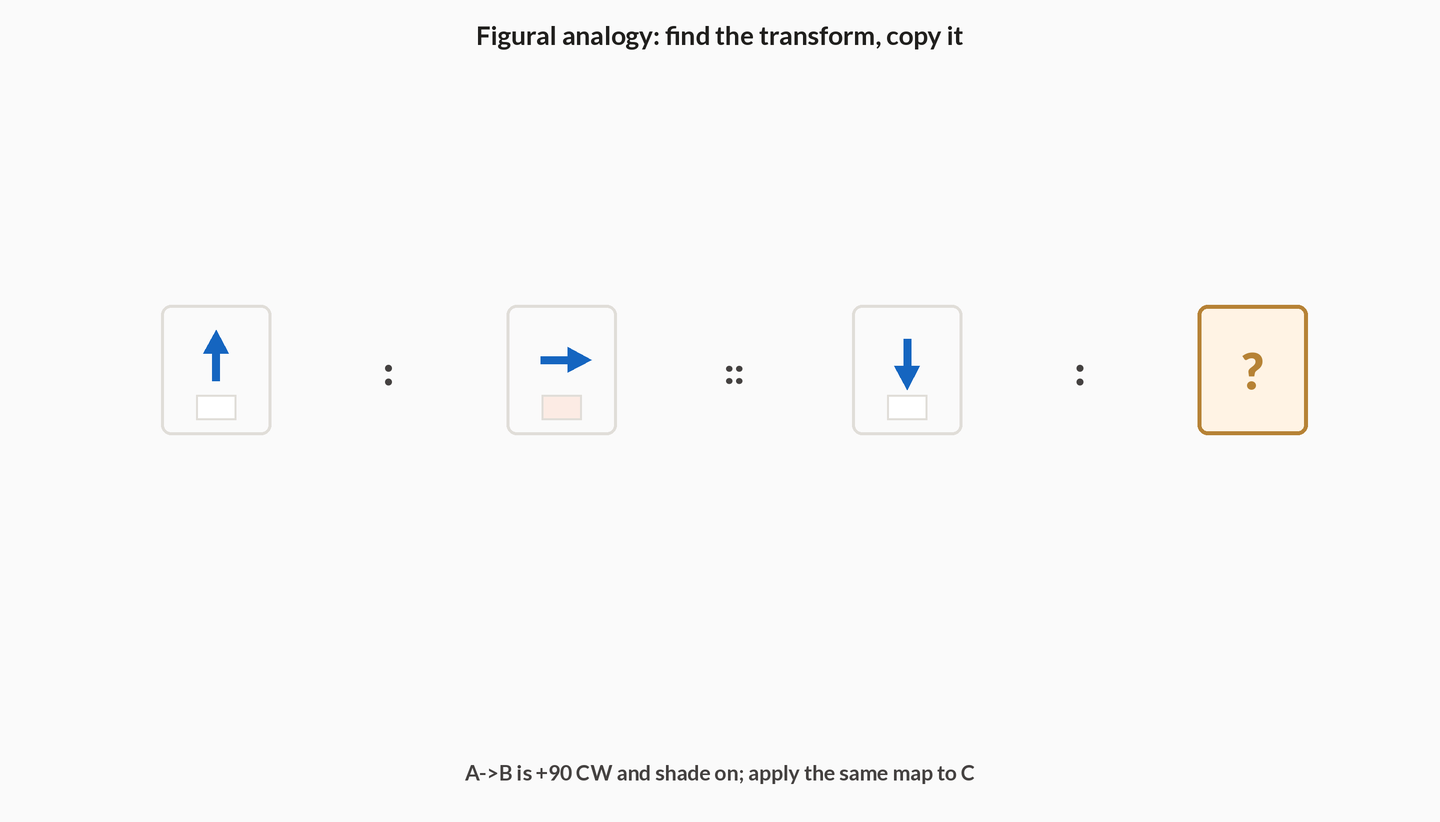
A figural analogy is not a series. There is no F1–F2–F3 to extend. The stem prints a finished pair A : B and an unfinished pair C : ?, read as 'A is to B as C is to what?'. The work is not to describe A or B in isolation — it is to name the transformation that takes A into B (rotation, addition of lines, shading swap, or a reflection reserved for the mirror topic) and then apply that same transformation to C.
Hold a concrete pair. A is an unshaded arrow pointing up (North). B is a shaded arrow pointing right (East). Two things happened, and you must name both: the arrow rotated 90° clockwise, and the fill turned from empty to shaded. Write that as one short phrase before you touch C: '+90° clockwise and shade-on'. C is an unshaded arrow pointing down (South). Copy only that phrase: rotate 90° clockwise (South becomes West) and turn the fill on. The answer is a shaded arrow pointing West.
Distractors usually apply a different transform that looks plausible if you only glanced at A and C. An option that only rotates C, or only shades C, or rotates C anticlockwise 'to balance the pair', is a different transform the A–B pair never showed. The Common A→B transforms table is the scan list. The intended rule is almost always a single clean change, or two changes that both appear in A→B, never a remix you invent at C.
Decode then copy
- Name A→BState the transform in one phrase before looking at C. On the running pair that phrase is 'rotate 90° clockwise and shade-on' — up-unshaded becomes right-shaded. If you cannot finish the phrase, you have not found the rule yet.
- Reject mixed rulesIf two different transforms both seem to fit A→B, look again — the intended rule is almost always a single clean change, or the two changes that both actually appear in the pair. Do not add a third change at C.
- Apply to CRun only that named transform on C: down-unshaded becomes West-shaded. Eliminate options that add an extra change, reverse the sense, or skip the shading half of the phrase.
| Transform | What stays fixed |
|---|---|
| Rotation by a fixed angle | Shape and shading of regions |
| Add or remove a fixed number of lines | Orientation of the figure |
| Shading swap (filled ↔ empty) | Outline and orientation |
| Element moved by a fixed step | Everything except that element's seat |
In a figural analogy, A turns into B by a 90° clockwise rotation and nothing else. The correct match for C must
- Rotate C 90° clockwise and also invert its shading
- Rotate C 90° clockwise only
- Rotate C 90° anticlockwise to 'balance' the pair
Copy the A→B rule exactly. Adding a shading change or reversing the sense invents a second transform the pair never showed.
4Odd-figure classification
Odd-figure classification is the same skill as verbal classification, done with pictures. Four figures are shown; three share one crisp geometric property and one breaks it. The shared property is usually countable: equal sides, a fixed number of sides, the same symmetry, or the same shaded-region rule. You are not being asked which figure is ugliest, largest, or 'most different' in taste. You are being asked which one fails a property the other three pass.
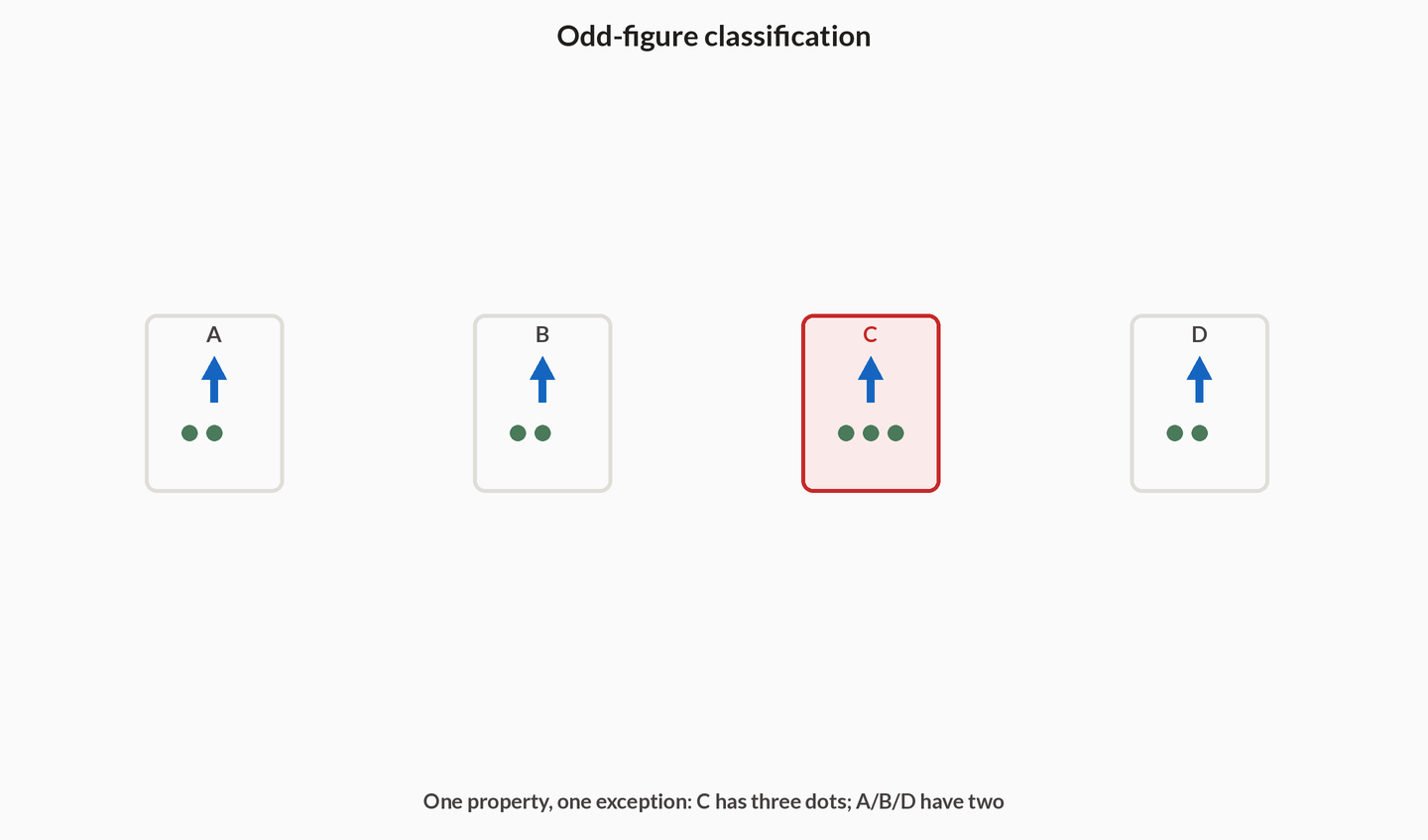
The running set is four labelled options A, B, C, D. Each shows an up arrow. A, B and D have two dots; C has three. The countable property is 'exactly two dots'. Three figures have it; C does not. C is the odd one. The outlier usually differs on exactly one countable feature. Start with the property that is easiest to check for every figure, then confirm the other three agree on it.
The Properties that separate outliers table is the scan list: all sides equal (a rectangle among regular polygons), same number of sides (a pentagon among quadrilaterals), same symmetry (a figure whose axis is tilted), or the same shaded-region rule. Pick one, test all four figures, and stop when three match and one fails. If two figures fail the property you picked, you chose the wrong property — drop it and pick another from the list. Do not hunt for a story that involves every detail of the drawings; that story will fit two different outliers and is not a classification rule.
Find the shared rule
- Pick a crisp propertyEqual sides, side count, line of symmetry, or shaded-region count — something you can verify on each figure without taste. On the running set that property is 'exactly two dots'.
- Test all fourMark which figures satisfy the property. A, B and D have two dots (match); C has three (fail). Three should match and one should fail. If two fail, you chose the wrong property.
- Name the odd oneThe figure that breaks the shared property is the answer — here C. Do not then search for a second story that would make A odd as well; one countable feature is the rule.
| Property | Typical odd one |
|---|---|
| All sides equal (regular) | Rectangle or irregular polygon among regular ones |
| Same number of sides | Pentagon among quadrilaterals |
| Same symmetry (e.g. vertical mirror) | Figure whose axis is tilted or absent |
| Same shaded-region rule | Figure with a different half shaded |
Figural classification
Four figures are drawn: three are regular polygons with all sides equal (triangle, square, pentagon) and one is a rectangle with unequal sides. Which is the odd one?
- Shared property under testall sides equal (regular)
- Equilateral triangle, square, regular pentagoneach has all sides equal — match
- Rectangle with unequal adjacent sidesbreaks 'all sides equal'
- Odd figurethe rectangle
Pro tip. Check one crisp geometric property (equal sides, symmetry, number of enclosed regions) to separate the outlier fast — do not hunt for a story that involves every detail of the drawings.
Three figures are equilateral triangles of different sizes and one is an isosceles triangle with two equal sides only. The odd one is the isosceles triangle because
- It is larger than the others
- It breaks the 'all sides equal' property the other three share
- Triangles cannot be compared by side equality
Size is irrelevant when the shared rule is regularity. The isosceles triangle is the only one that fails all-sides-equal, which is the countable property the set was built on.
5When several attributes change at once
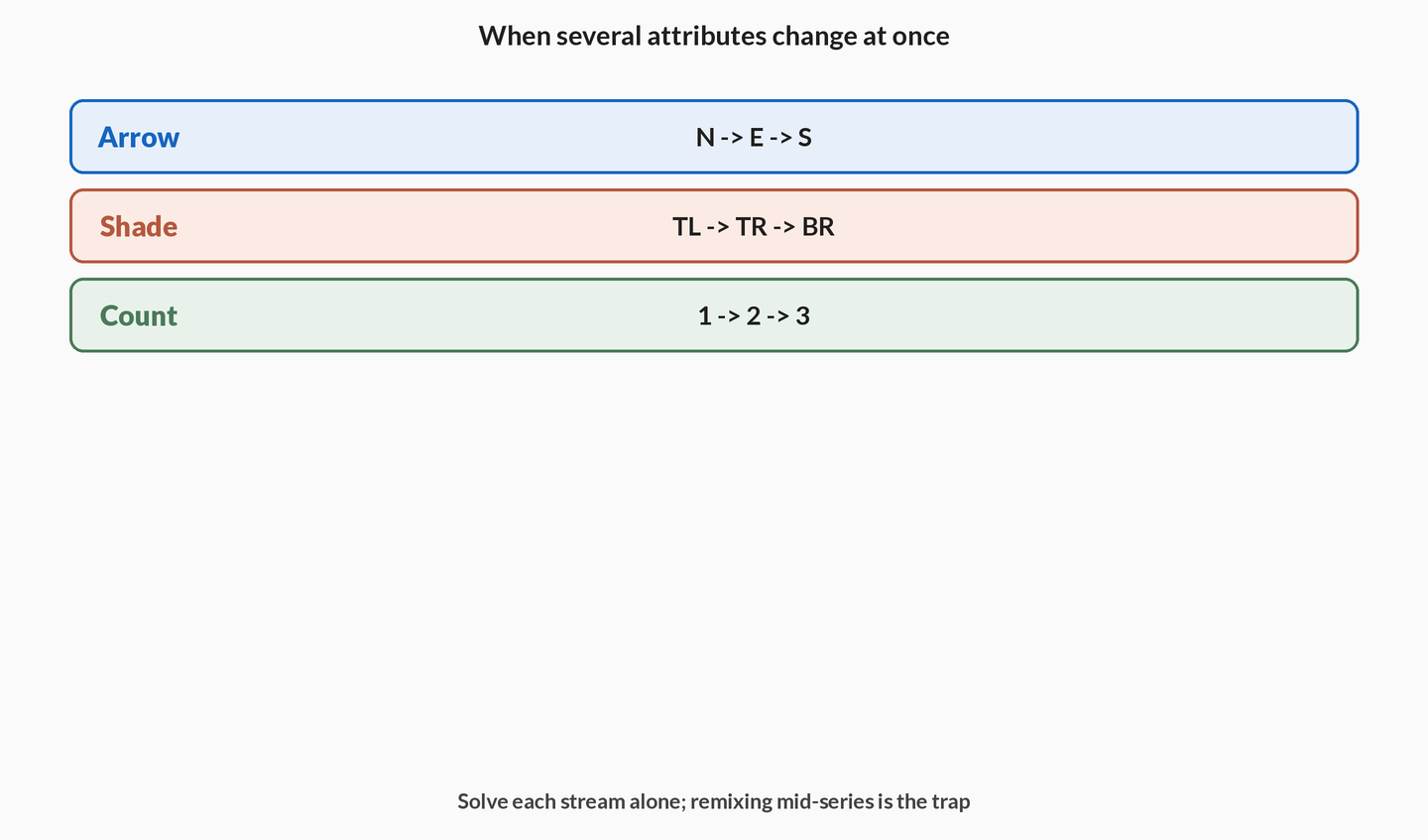
The expensive trap in non-verbal series is simultaneous change: a shape rotates and its shading alternates and a dot moves. That is not a harder series. It is the element-tracking attack with the examiner betting you will track only the most obvious motion. The running strip is exactly this trap: the arrow turns, the shade walks, and the dots increase, all at once. An option that continues two of the three streams and freezes the third is built to catch anyone who locked onto the turning arrow and stopped.
List every changing attribute before choosing. On the running strip that list is three words: rotation, shading-position, count. Predict the next state of each from the last given frame: West, bottom-left, 4 dots. Eliminate any option that violates even one tracked stream — the correct option must satisfy all of them at once. An option that shows West and 4 dots but keeps the shade at bottom-right is wrong, even though two of the three streams look perfect.
The Why a distractor survives table names the failure modes by what you tracked. Track rotation only, and the distractor turns correctly while freezing shading or the moving dot. Track shading only, and it toggles fill correctly at the wrong orientation. Track count only, and it adds the next dot while ignoring a turn. Track all streams, and only the true next frame survives. That last row is the whole defence: write the streams in one line, extend each, and drop partial matches.
List then eliminate
- List every streamWrite rotation, count, shading and position in one line. On the running strip: arrow 90° clockwise, shade walks the 2-by-2, dots +1. Leave a blank if a stream does not move — a still background is not a fourth stream.
- Predict the next stateExtend each non-blank stream by one step from the last given frame: West, bottom-left, 4 dots. Write those three predictions before you open the options.
- Kill partial matchesDrop any option that fails a single stream, even if the other streams look perfect. West-and-4-dots with the shade stuck is the trap this concept exists to kill, not a near-miss.
| What you tracked | What the distractor does |
|---|---|
| Rotation only | Turns correctly, freezes shading or the moving dot |
| Shading only | Toggles fill correctly, wrong orientation |
| Count only | Adds the next line, ignores a turn |
| All streams | Only the true next frame survives |
A series rotates a triangle 90° clockwise each frame and toggles its interior shading each frame. An option that rotates correctly but keeps the previous shading is
- Acceptable if rotation is the harder rule
- Wrong — it fails the shading stream
- Correct because shading is decoration
Both streams are load-bearing. A partial match that continues only the turn is exactly the distractor the trap is built from.
6Count steps and shading parity
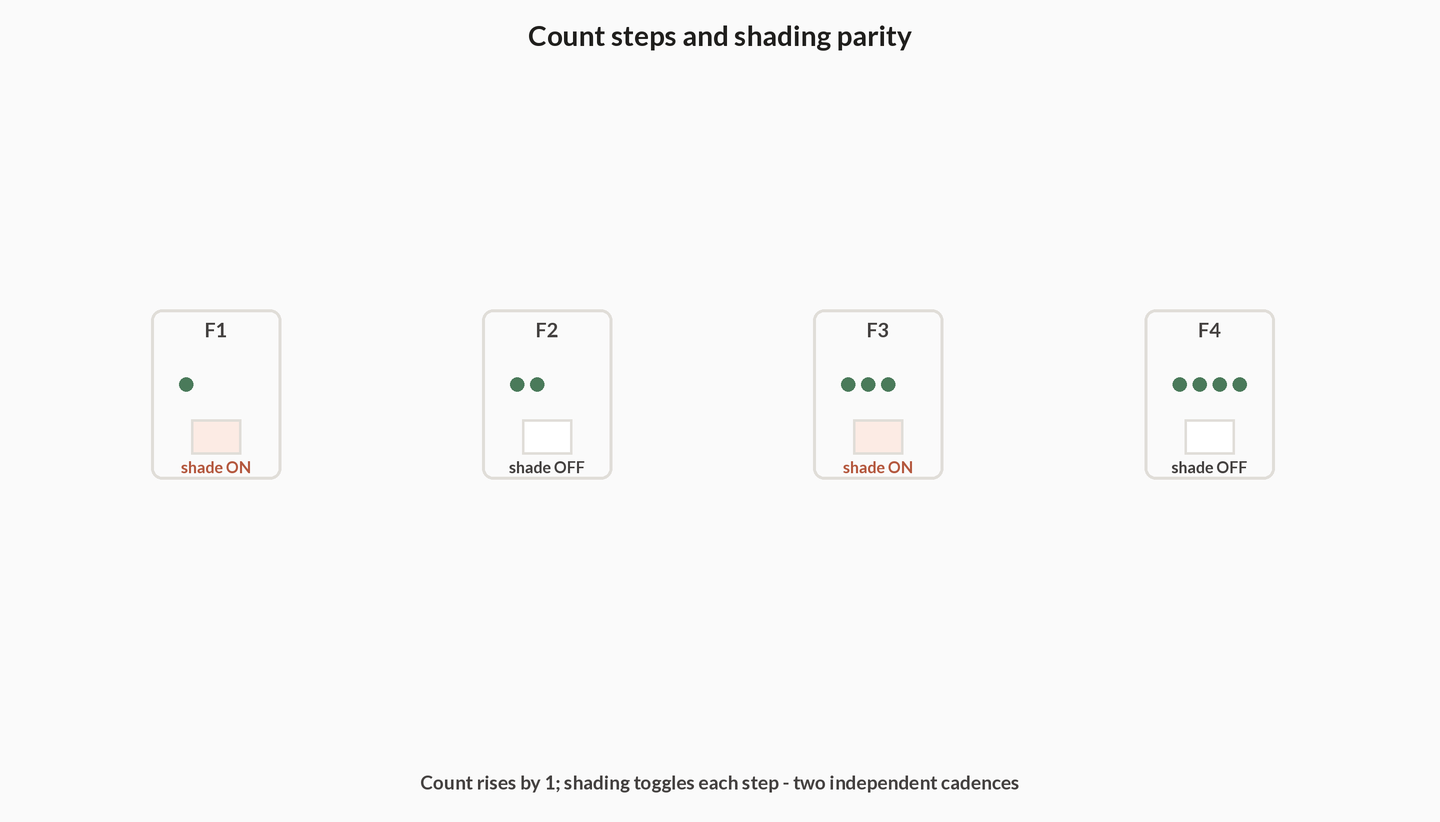
Two streams have a default cadence so regular that examiners use them as wallpaper behind a louder rotation. When lines or dots are added, the count change per step is usually constant: if each frame gains one line, the next frame has one more line than the last. Read the difference between consecutive frames; do not invent an accelerating pattern unless two differences already show it. On the running strip the dots go 1, 2, 3 — differences +1, +1 — so F4 has 4 dots, not 5 and not 3.
Shading often toggles with period 2 — on, off, on, off — so the next frame's fill is the opposite of the current one. Period 2 means the pattern repeats every two frames: frame n and frame n+2 match, and the answer frame flips relative to the last given frame. Check the parity of the frame index against that toggle before you accept an option that 'looks similar'. If F1 is filled, F2 empty, F3 filled, then F4 is empty. An option that shows the right count still filled is continuing only the count stream.
The Cadence checks table is the pair of default rules plus the combination warning. Line or dot count: same difference as the previous step (often +1 or −1). Shading toggle period 2: opposite of the last frame's fill. Count and shading together: both rules must hold; either alone is a distractor. Apply count and shading after rotation and position are fixed, so a pretty fill does not excuse a wrong count, and a correct count does not excuse a freeze in shading.
Read the cadence
- Diff the countsSubtract consecutive frame counts; a steady +1 or −1 is the default rule. Dots 1, 2, 3 give +1, +1, so the next count is 4. Do not ramp to +2 unless two given differences already climb.
- Check shading parityIf fill alternates, frame n and frame n+2 match; the answer frame flips relative to the last given frame. Filled, empty, filled forces empty next. Period 2 is a toggle, not a freeze.
- Combine with other streamsApply count and shading after rotation and position are fixed, so a pretty fill does not excuse a wrong count. On the running strip, West plus 4 dots plus the next shade cell must all hold together.
| Signal | Default next-frame rule |
|---|---|
| Line or dot count | Same difference as the previous step (often +1 or −1) |
| Shading toggle period 2 | Opposite of the last frame's fill |
| Count and shading together | Both rules must hold; either alone is a distractor |
Frames show 2, 3 and 4 parallel lines in order, and shading toggles filled → empty → filled. The next frame should show
- 5 lines, empty
- 5 lines, filled
- 4 lines, empty
Count rises by +1 each step, so 4 is followed by 5. Shading ran filled, empty, filled — period 2 — so after filled comes empty. Five lines still filled continues only the count; four lines empty continues only the shading.
Notes
- Figural Series - Element Tracking: Track each element separately across frames for its rotation (clockwise/anticlockwise), movement (step positions), and count (added/removed). The next figure applies each tracked change once more.
- Rotation Rules: Note the angle of turn per step (45, 90, 135 degrees) and direction; an arrow rotating 45 clockwise each frame will point in the next 45-step position in the answer.
- Figural Analogy: Determine the transformation from figure 1 to figure 2 (rotation, reflection, addition of lines, shading swap) and apply the same transformation to figure 3.
- Odd-Figure Classification: Four figures share a property (same number of sides, same symmetry, same shaded region rule); the one breaking that property is the answer.
- Common trap: Multiple simultaneous changes occur (a shape rotates AND its shading alternates AND a dot moves) - miss one and you pick a distractor; list all changing attributes before choosing.
Formulas
- Rotation per step = total turn observed \div number of steps between the given frames.
- Clockwise 90 sends top->right->bottom->left; anticlockwise reverses this cycle.
- Reflection flips left-right (mirror) or top-bottom (water) while preserving internal element positions relative to the axis.
- Element count change per step is constant; if +1 line per frame, the next frame has one more line.
- Shading often toggles with period 2 (on, off, on, off) - check parity of the frame index.
Exam traps & shortcuts
- Make a small table of attributes (rotation, count, shading, position) and fill it per frame to expose the rule.
- For rotation questions, mark one reference element (an arrow tip or dot) and follow only that across frames.
- In classification, count sides/lines and check symmetry - the outlier usually differs on exactly one countable feature.
- Eliminate options that violate any single tracked attribute; the correct option must satisfy all of them at once.
Reference tables
Closed forms from the legacy formula sheet — use them after the attribute table is filled, not instead of it.
| Rule | Statement |
|---|---|
| Rotation per step | Total turn observed ÷ number of steps between the measured frames |
| Clockwise 90° | Top → right → bottom → left; anticlockwise reverses the cycle |
| Count change | Usually constant per step; next frame continues the same difference |
| Shading period 2 | On, off, on, off — check parity of the frame index |
Recap
Read only this the night before.
- Attribute table
- Rotation, count, shading, position — fill every stream before you look at options.
- One reference mark
- For rotation, follow one tip or corner; measure the turn once, confirm on the next pair, apply once more.
- Analogy
- Name A→B in one phrase, then copy only that transform onto C.
- Odd one
- Three share one countable property; the outlier breaks exactly that property.
- Partial match
- An option that continues two streams and freezes a third is wrong — all streams must advance together.
Practise Non-Verbal Reasoning
Reading is free and needs no account. Practice, mocks and progress live in the app.
- 43 exam-style questions on this topic, with explanations
- A 4-question practice set that ends the chapter
- Timed mocks scored with the real marking scheme
- Readiness tracked per topic, kept on your device