Digital SAT Prep · Digital SAT Reading, Writing & Math
Digital SAT Structure and Adaptive Format
Overall two-section, two-module adaptive design and timing of the Digital SAT.
Seven concepts. The Digital SAT is two sections — Reading and Writing, then Math — each split into two timed modules. Module 2 difficulty tracks Module 1 performance, the score scale is 400–1600 with no wrong-answer penalty, and Bluebook tools (including Desmos on every Math question) stay available for the whole sitting.
- Digital SAT Prep
- Easy level
- 7 concepts
- 5 practice questions
1Two sections, four modules
The Digital SAT has two sections: Reading and Writing, then Math. Each section is split into two modules, so the sitting is four timed modules in order. The whole test runs about 2 hours 14 minutes of section time — Reading and Writing first, Math second.
You cannot reorder sections or jump from Math back into Reading and Writing. Within a module you can move among its questions; once a module ends, that set is locked.
Figure. Four timed modules in fixed order: RW Module 1 then RW Module 2, then Math Module 1 then Math Module 2. Module 2 in each section is the adaptive half.
| Piece | What it is |
|---|---|
| Section 1 | Reading and Writing (two modules) |
| Section 2 | Math (two modules) |
| Modules per section | 2 — Module 1, then Module 2 |
| Section time total | About 2 hours 14 minutes |
A student finishes Reading and Writing Module 2. What comes next in a standard Digital SAT sitting?
- A second Reading and Writing Module 1 on a new passage set
- Math Module 1
- Math Module 2, because Module 1 was skipped for high scorers
Order is Reading and Writing (both modules), then Math. Math begins at Module 1; Module 2 is never skipped, and there is no third Reading and Writing module after the section ends.
2Question counts and module times
Reading and Writing has 54 questions in about 64 minutes — two modules of 32 minutes each. Math has 44 questions in about 70 minutes — two modules of 35 minutes each. Those counts and clocks are fixed for the Digital SAT sitting this topic covers.
Average pace is not the same across sections: Math gives more time per question than Reading and Writing, so a Math item that takes two minutes can still fit the schedule while a two-minute Reading item eats the bank.
Figure. Fixed clocks: Reading and Writing 54 questions in about 64 minutes; Math 44 questions in about 70 minutes. Math gets more minutes per item on average.
| Section | Questions | Total time | Module length |
|---|---|---|---|
| Reading and Writing | 54 | ~64 minutes | 2 × 32 minutes |
| Math | 44 | ~70 minutes | 2 × 35 minutes |
Which Digital SAT section pairs 44 questions with about 70 minutes?
- Reading and Writing
- Math
- Either section — both use 44 questions
Math is 44 questions in ~70 minutes (two 35-minute modules). Reading and Writing is 54 questions in ~64 minutes. The counts are not interchangeable.
3Module 2 difficulty tracks Module 1
Each section is module-adaptive: how you do on Module 1 sets whether Module 2 is the harder or the easier route. Strong Module 1 performance routes you to the harder Module 2; weaker Module 1 performance routes you to the easier Module 2.
The harder Module 2 is required to reach the top of that section's score scale. A soft Module 1 can leave you on a route whose ceiling sits below the highest possible section scores even if Module 2 itself goes perfectly.
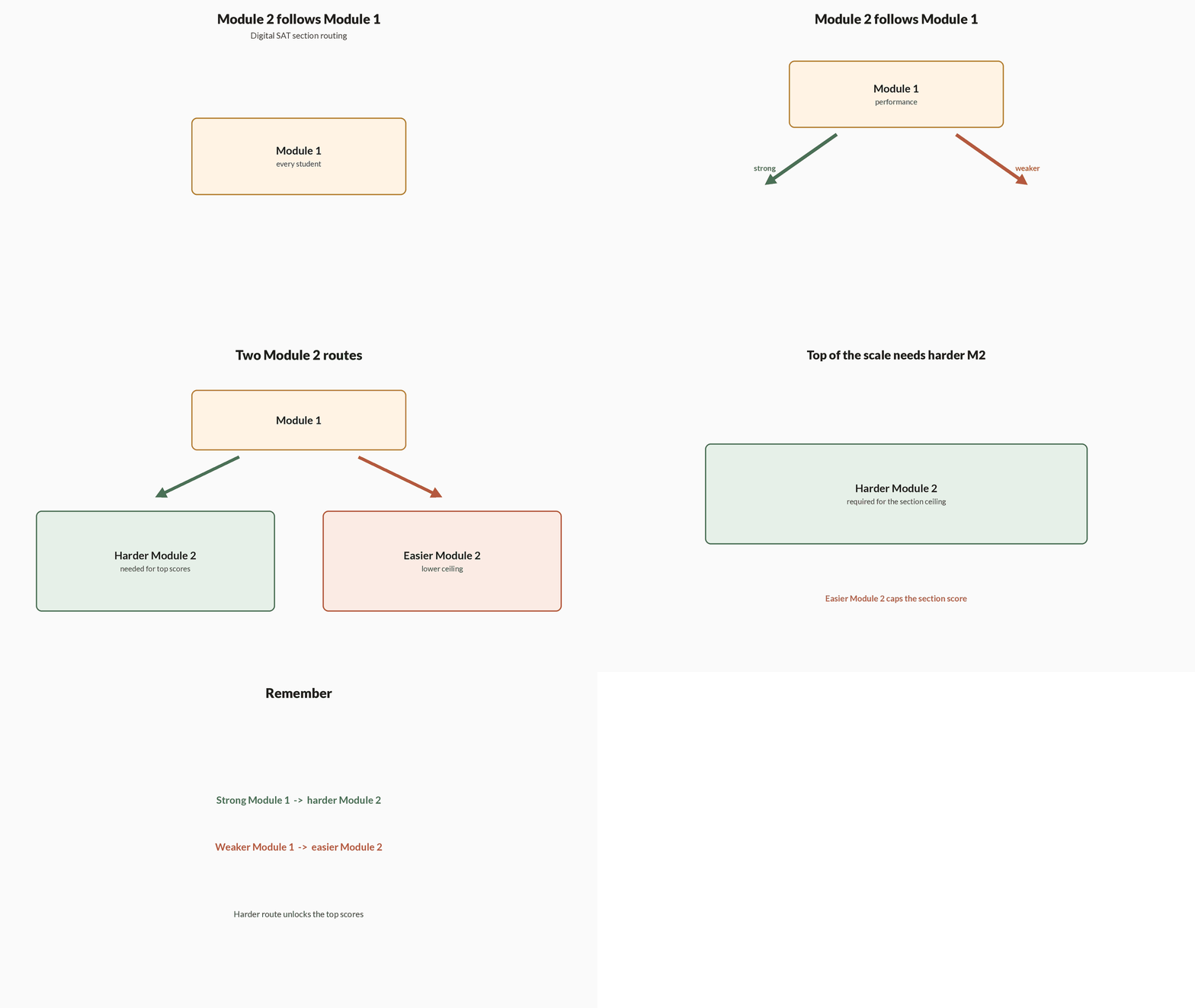
How routing works
- Sit Module 1Every test-taker gets the same first module for that section; accuracy there is the routing input.
- Route Module 2Mostly correct Module 1 answers unlock the harder second module; weaker Module 1 answers unlock the easier second module.
- Score ceilingOnly the harder Module 2 keeps the top of the section scale in reach — Module 2 performance then places you inside that unlocked band.
A student answers most of Reading and Writing Module 1 correctly. What happens in Module 2, and why does it matter?
- Module 2 gets easier, which raises every score automatically
- Module 2 gets harder, which is required to reach the top of the section scale
- Module 2 is skipped and the section score is locked from Module 1 alone
Strong Module 1 performance routes to the harder Module 2. That harder route is necessary for the highest section scores; Module 2 is never skipped, and an easier Module 2 is the weak-Module-1 path, not a free score boost.
4Score scale and rights-only scoring
The total Digital SAT score runs from 400 to 1600. Reading and Writing and Math each contribute a section score from 200 to 800; the total is those two section scores added together.
There is no penalty for wrong answers — scoring is rights-only. A blank and a wrong pick both earn zero on that item, while a guess still keeps a chance of credit, so leaving a question blank is never safer than an informed guess before the module ends.
Figure. Total score is the sum of two section scores. Wrong and blank both score zero, so guessing after eliminating beats leaving a blank.
| Score | Range |
|---|---|
| Total | 400–1600 |
| Reading and Writing | 200–800 |
| Math | 200–800 |
| Wrong-answer rule | No penalty (rights-only) |
Thirty seconds remain in a Math module and two questions are still blank. With no time to solve them, the better move is to
- Leave both blank so wrong answers cannot lower the score
- Enter a best guess on each before time expires
- Exit the module early to protect accuracy on the answered items
Rights-only scoring means wrong answers are not subtracted. Blank and wrong both score zero on those items; a guess retains a chance of credit. Exiting early does not raise the score on items already answered.
5Bluebook tools on every Math question
The Digital SAT runs in the Bluebook app. For Math, an on-screen Desmos graphing calculator is available on every question — there is no calculator / no-calculator split. A math reference sheet is also built in.
Across both sections you can annotate and flag items for review inside the current module. Those tools do not extend past a module boundary: when the module clock ends, unfinished flagged items stay unanswered.
Figure. Every Math question has on-screen Desmos and the reference sheet — there is no calculator / no-calculator split. Annotate and flag stay inside the open module.
| Tool | Where it applies |
|---|---|
| Desmos graphing calculator | All Math questions |
| Math reference sheet | Math section |
| Annotation | Available in-module on both sections |
| Mark for review | Flag and return within the same module |
On Digital SAT Math, a student reaches a graphing-heavy item without a hand-held calculator. The built-in option is
- Unavailable — graphing items appear only on a no-calculator module
- The on-screen Desmos graphing calculator, allowed on every Math question
- A four-function on-screen pad only; graphing requires bringing a physical device
Bluebook provides Desmos for all Math questions; there is no no-calculator Math module on the Digital SAT. A four-function-only restriction is the wrong model for this sitting.
6Math average pace from 70 ÷ 44
Math's clock and count fix an average pace: 70 minutes for 44 questions is a little under 1.6 minutes per question, about 95 seconds. That average is a planning number, not a stopwatch rule for every item.
Easy items should finish under that average so harder items and marked reviews can spend more. An item that burns past two minutes without a clear path is usually better flagged and revisited inside the same module.
Figure. Seventy minutes over forty-four questions is about ninety-five seconds each — a planning average, not a stopwatch for every item.
Turn the section clock into a pace
- DivideSection minutes ÷ question count gives average minutes per question.
- ConvertMultiply that average by 60 when you want seconds.
- BudgetSpend less than average on easy items; flag anything that has already eaten well past two minutes with no path.
Average time per Math question
The Math section has 44 questions in 70 minutes. Roughly how long can you spend per question on average?
- 70 \div 44\approx 1.59 minutes
- 1.59 \times 60\approx 95 seconds
Pro tip. Treat ~95 seconds as the section average, not a hard cap — bank time on short items so multi-step Algebra and geometry can go longer.
Using 70 minutes for 44 Math questions, the average pace is closest to
- 45 seconds per question
- 95 seconds per question
- 3 minutes per question
70 / 44 \approx 1.59 minutes, and 1.59 \times 60 \approx 95 seconds. 45 seconds is roughly half that average; 3 minutes would only cover about 23 of the 44 questions.
7Mark for review inside the open module
Mark-for-review lets you flag a time-consuming item, continue through the rest of the module, and return while that module's clock is still running. The flag does not preserve access after the module submits.
Because wrong answers are not penalised, the endgame inside a module is eliminate-and-guess on anything still blank — including flagged items you never fully solved — rather than leaving empties when time expires.
Figure. Mark a slow item, finish the rest of the open module, then return while that module's clock still runs. After submit, the flag cannot bring the item back.
Use the flag without stranding blanks
- Flag and moveIf an item is eating the clock with no clear next step, mark it and continue so later easy points are not lost.
- Return inside the moduleUse remaining time to revisit flagged items while the module is still open.
- Guess before submitIn the last half-minute, enter a best guess on every still-blank item — including flags you did not finish.
A Math Module 1 question is still flagged with five seconds left and no solution. The student should
- Leave it blank so a wrong pick cannot hurt the Module 2 route
- Enter a best guess before the module ends
- Wait for Module 2, where flagged Module 1 items reopen
Flags do not reopen in Module 2, and rights-only scoring means a blank cannot protect the score or the route better than a guess. Enter a best guess before Module 1 submits.
Notes
- Two Sections: The Digital SAT has a Reading and Writing section and a Math section, each split into two modules, for a total of about 2 hours 14 minutes.
- Module-Adaptive Design: Each section's second module gets harder or easier based on performance in the first module, which affects the score range you can reach.
- Built-In Tools: The Bluebook app provides an on-screen Desmos graphing calculator (allowed for all Math questions), a reference sheet, and an annotation and mark-for-review feature.
- Scoring: Total score is 400-1600, combining Reading and Writing (200-800) and Math (200-800); there is no penalty for wrong answers, so guess on every question.
Formulas
- Structure: 2 sections (Reading & Writing, Math), each with 2 modules.
- Reading & Writing: 54 questions in ~64 minutes (two 32-minute modules).
- Math: 44 questions in ~70 minutes (two 35-minute modules).
- Scoring: 400-1600 total; no wrong-answer penalty (rights-only scoring).
Exam traps & shortcuts
- Since there is no guessing penalty, never leave a question blank—eliminate and guess before time runs out.
- Perform well on Module 1 to unlock the harder, higher-scoring Module 2, which is required to reach top scores.
- Use the mark-for-review flag to skip time-consuming items and return to them within the same module.
Reference tables
One page for the sitting shape, clocks and score scale this topic keeps returning to.
| Item | Detail |
|---|---|
| Sections (order) | Reading and Writing → Math |
| Modules | 2 per section (Module 2 adaptive on Module 1) |
| Reading and Writing | 54 questions; ~64 minutes (2 × 32) |
| Math | 44 questions; ~70 minutes (2 × 35) |
| Total section time | About 2 hours 14 minutes |
| Score scale | 400–1600 total; each section 200–800 |
| Wrong answers | No penalty — never leave a blank |
| Math calculator | On-screen Desmos on every Math question |
Recap
Pin these before you sit a Bluebook practice test.
- Shape
- Reading and Writing → Math; each section has two modules; ~2 h 14 min of section time.
- Clocks
- RW 54 q / ~64 min (2×32); Math 44 q / ~70 min (2×35).
- Adaptive
- Module 1 performance routes harder or easier Module 2; harder Module 2 needed for top section scores.
- Score
- Total 400–1600; sections 200–800 each; rights-only — guess rather than blank.
- Tools
- Desmos on every Math question; reference sheet; annotate and mark-for-review inside the open module only.
- Math pace
- ~95 seconds per question on average (70/44); bank time on easy items.
Practise Digital SAT Structure and Adaptive Format
Reading is free and needs no account. Practice, mocks and progress live in the app.
- 5 exam-style questions on this topic, with explanations
- A 5-question practice set that ends the chapter
- Timed mocks scored with the real marking scheme
- Readiness tracked per topic, kept on your device